Main Configuration
This is the main control logic configuration:
timezone: Europe/Berlin #your time zone. not optional.
time_resolution_minutes: 60 # Time resolution for forecasts: 15 (quarter-hourly) or 60 (hourly). Default: 60
loglevel: debug
logfile_enabled: true
log_everything: false # if false debug messages from fronius.auth and urllib3.connectionpool will be suppressed
max_logfile_size: 200 #kB
logfile_path: logs/batcontrol.log
Time Resolution (with 0.6.0)
time_resolution_minutes: 60
Recommendation: Use 15 minutes if your dynamic tariff provider offers quarter-hourly prices (e.g., some Tibber or energyforecast.de plans). Use 60 minutes for standard hourly tariffs or if you want to minimize resource usage.
Technical Details: - 15-min mode: 192 intervals per 48 hours (~8 KB per forecast) - 60-min mode: 48 intervals per 48 hours (~2 KB per forecast) - All forecast providers automatically adapt to the configured resolution - MQTT topics publish data at the configured interval
Timezone
This parameter is used to calculate the correct time for your location, as some datasources deliver UTC based timeslots. Valid values are tz based(wikipedia).
Logfile
Logpath
logfile_path: logs/batcontrol.log
Log Level
loglevel: debug
- error
- warning
- info
- debug
The recommended settings are info and debug.
To reduce the noise in the default setup, we introduced
log_everything: false
true, the logmessage from Fronius authentication logic + HTTP-Requests are visible in the logfile. These are very verbose messages, which is the reason to only enable it for debugging purposes.
Enable / Disable logfile
logfile_enabled: true
This parameter is used to enable a pyhsical logfile. Console out is still active if this value is set to false. This can be useful in docker-based environments.
Logsize
max_logfile_size: 200 #Kb
max_logfile_size. This is used to avoid a filling up disk.
Batcontrol alogrithm configuration
battery_control:
  min_price_difference: 0.05
  min_price_difference_rel: 0.10
  always_allow_discharge_limit: 0.90
  max_charging_from_grid_limit: 0.80
  min_grid_charge_soc: 0.55 # optional: grid-charge to this SoC before expensive slots
  grid_charge_target_strategy: fixed # optional: fixed or forecast
  min_recharge_amount: 100
always_allow_discharge_limit & max_charging_from_grid_limit is explained here. always_allow_discharge_limit: 0 (or a negative value) is rejected at startup: it would allow discharging at every SoC, so batcontrol would never control anything. 1.0 allows discharging freely only at a full battery.
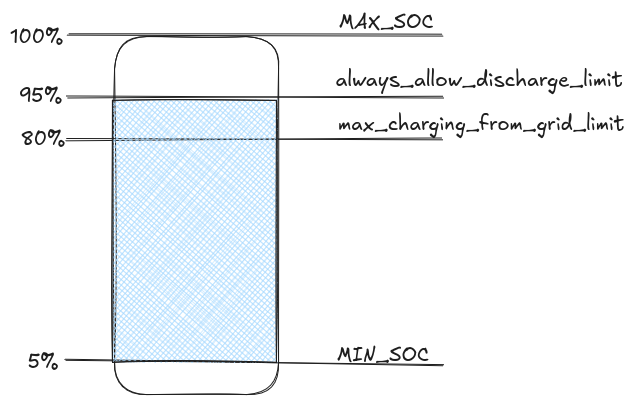
min_grid_charge_soc is optional. When set as a ratio, for example 0.55, it is a minimum SoC that batcontrol secures from the grid independent of the forecast demand. Leave it unset to keep the default behavior.
Without it, batcontrol only recharges the energy the upcoming expensive slots are expected to need, minus what is already stored. With it, every economical grid-charging opportunity charges the battery at least up to this SoC:
- The trigger is the price signal only: a later slot with consumption that is more expensive than the current one by at least
min_price_difference, while discharging is currently held back. - The amount is not tied to the demand. Even when the stored energy already covers the expensive slots, batcontrol still charges up to
min_grid_charge_soc. Example: 25 % SoC, the expensive slots need less than what is stored,min_grid_charge_soc: 0.55- batcontrol charges to 55 %. - If the demand calls for more than the target, the higher amount is charged, as usual.
- Without a price signal nothing is charged: the value is not a floor that is kept at any price.
grid_charge_target_strategy controls how min_grid_charge_soc is applied:
fixed(default): charge at least up tomin_grid_charge_soc, as described above.forecast: use existing high-price-slot demand as an additional reserve. The target is roughlymin_grid_charge_socenergy plus the calculated high-price required energy, capped bymax_charging_from_grid_limit.
To also preserve this target as reserved energy during cheap/pre-expensive windows, enable the expert option preserve_min_grid_charge_soc. Without that expert option, the strategy affects grid recharge only and does not add extra discharge blocking.
If min_grid_charge_soc is higher than max_charging_from_grid_limit, grid charging cannot reach the configured minimum SoC target. Batcontrol will log a warning in this case; increase max_charging_from_grid_limit or lower min_grid_charge_soc so the settings correlate.
min_recharge_amount is the minimum amount of energy (Wh) that must be recharged before batcontrol activates battery charging. Once the required recharge energy reaches this minimum, batcontrol adds the same amount on top of the energy to charge, so it does not get stuck right at the threshold.
Battery Control Expert Tuning Parameters
battery_control_expert:
  charge_rate_multiplier: 1.1
  soften_price_difference_on_charging: false
  soften_price_difference_on_charging_factor: 5
  spread_grid_charge_over_charge_window: true
  round_price_digits: 4
  production_offset_percent: 1.0
  preserve_min_grid_charge_soc: false
  market_price_refresh_time: "12:30"
  max_forecast_hours: 0
These expert parameters allow fine-tuning of Batcontrol's behavior. See Battery Control Expert for detailed explanations of each parameter:
| Parameter | Type | Default | Description |
|---|---|---|---|
charge_rate_multiplier |
float | 1.1 | Multiplier for calculated charge rate to compensate for charging inefficiencies |
soften_price_difference_on_charging |
boolean | false | Enable earlier charging based on more relaxed price difference calculations |
soften_price_difference_on_charging_factor |
integer | 5 | Factor to soften price difference requirements when enabled |
spread_grid_charge_over_charge_window |
boolean | true | With soften enabled: calculate the grid charge rate over all following slots that are not more expensive than the current slot plus the soften margin (min_price_difference / soften_price_difference_on_charging_factor), instead of the current slot only |
round_price_digits |
integer | 4 | Decimal places for price rounding in comparisons |
production_offset_percent |
float | 1.0 | Multiplier to adjust solar production forecast (1.0 = no change, 0.8 = 80%, etc.) |
preserve_min_grid_charge_soc |
boolean | false | Also preserve min_grid_charge_soc as reserved battery energy during cheap/pre-expensive windows |
market_price_refresh_time |
string | "12:30" | UTC time ("HH:MM") of the daily forced price refresh that picks up newly published next-day prices. An invalid value aborts startup |
max_forecast_hours |
float | 0 | Use at most this many hours of the forecasts, for example 48. 0 does not limit the horizon |
Configuration check at startup (with 0.11.1)
At startup batcontrol checks battery_control and battery_control_expert and reports its findings in the log, with the prefix [Config]. This is the first step of moving the configuration to typed models (plan); the other sections follow later.
Warnings - the value is used as before, but it is very likely wrong:
| Key | Warning when | Typical cause |
|---|---|---|
always_allow_discharge_limit |
above 1 | 90 instead of 0.90 - Always-Allow would never trigger (0 and below stop startup, see below) |
max_charging_from_grid_limit |
outside 0..1 | 80 instead of 0.80 |
min_price_difference, min_price_difference_rel |
below 0 | |
min_recharge_amount |
below 0 | |
battery_control_expert.round_price_digits |
below 0 | a negative value rounds every price to 0, so no grid charging happens |
battery_control_expert.production_offset_percent |
above 2.0 | 80 instead of 0.8; MQTT and the API accept only 0..2 |
inverter max_soc |
below always_allow_discharge_limit (not checked for 1.0 and above) |
the battery never reaches the SoC above which discharging is always allowed |
| any key the two sections do not know | always | a typo, e.g. production_ofset_percent, which batcontrol would otherwise ignore silently |
The ranges are the same ones that the MQTT/API setters already enforce.
Numbers given as text are accepted: "0.05" (in quotes) or " 60 " is used as the number. The Home Assistant add-on delivers some numbers that way. This applies to all numeric keys of both sections and needs no action; it is not reported.
Errors - values batcontrol cannot use, for example a text that is not a number such as "abc" or "0,05" for min_price_difference, or an empty value. Values that already stopped batcontrol before (for example round_price_digits: four) still stop it with the same message.
Always stops startup, independent of the mode below: always_allow_discharge_limit of 0 or below (e.g. -0.1, also given as text). With it discharging is always allowed and the price based control never runs. false counts as 0 here. The MQTT/API setter rejects 0 as well and keeps the current value. Batcontrol logs the reason (level CRITICAL, prefix [Config]) and exits with code 1 before it connects to the inverter, so the inverter settings stay untouched.
The environment variable BATCONTROL_CONFIG_VALIDATION controls how errors are handled:
warn(default): errors are logged, batcontrol starts as it did before. A configuration that started with an earlier version keeps starting.strict: batcontrol stops at startup with a message that names the key. Warnings stay warnings.
time_resolution_minutes is checked before anything else is set up. Only 15 and 60 are accepted, also as text ("15", as the Home Assistant add-on delivers it, or " 15 "). Any other value, or a text that is not a number (e.g. "quarter"), stops startup with a message that names the key and the allowed values.