How Batcontrol Works
Batcontrol is an intelligent battery management system that optimizes your home energy storage by predicting energy prices, solar production, and consumption patterns. It automatically controls your battery inverter to minimize electricity costs.
Core Principle
The fundamental idea is simple: charge your battery when electricity is cheap and use stored energy when electricity is expensive. However, the implementation requires sophisticated forecasting and decision-making logic.
System Architecture
Main Components
- Forecasting Engines: Gather predictions for prices, solar production, and consumption
- Logic Engine: Calculates optimal battery control decisions
- Inverter Interface: Controls your battery inverter
- External APIs: Integrates with MQTT, evcc, and Home Assistant
Operation Cycle
Batcontrol runs in a continuous loop, evaluating conditions every 3 minutes:
1. Fetch Forecasts → 2. Calculate Optimal Strategy → 3. Control Inverter → 4. Wait 3 Minutes → Repeat
Forecasting System
Batcontrol combines three critical forecasts to make intelligent decisions:
1. Electricity Price Forecast
- Source: Dynamic tariff providers (Tibber, aWATTar, evcc, energyforecast.de, static tariff zones) — see Dynamic Tariff Provider
- Data: Electricity prices for the next 24-48 hours, in 15- or 60-minute slots depending on
time_resolution_minutes - Purpose: Identifies when electricity is cheapest for charging
2. Solar Production Forecast
- Source: Solar forecast APIs (Forecast.Solar, evcc, HomeAssistant Solar Forecast ML, Solcast) — see Solar Forecast
- Data: Expected PV generation based on weather predictions
- Configuration: Your PV system specifications (kWp, orientation, location)
- Purpose: Predicts available solar energy
3. Consumption Forecast
- Source: Load profile CSV file scaled to your annual consumption, or your actual historical data via the HomeAssistant API — see Consumption Forecast
- Data: Expected household energy usage patterns
- Purpose: Estimates energy demand throughout the day
Net Consumption Calculation
The key metric is Net Consumption = Consumption - Solar Production: - Positive values: You need energy from grid/battery - Negative values: You have surplus solar energy
Decision Logic
Based on the forecasts and current battery state, batcontrol puts your inverter into one of four modes:
Mode 10: DISCHARGE ALLOWED (Normal Operation)
- When: Energy is currently expensive OR battery is sufficiently charged
- Behavior:
- Battery can discharge to meet household demand
- Surplus solar energy charges battery (respects
max_pv_charge_rate) - Excess energy feeds into grid
- Always Active: When SOC >
always_allow_discharge_limit(typically 90%)
Mode 8: LIMIT BATTERY CHARGE RATE (Peak Shaving)
- Requires: version 0.8.0+ ,
peak_shaving.enabled: true - When: Peak shaving is enabled, PV is producing, and the battery should not fill up too quickly
- Behavior:
- Battery discharge is allowed (handles household demand normally)
- PV charging is rate-limited so the battery fills gradually instead of hitting 100% early in the day
- Excess PV energy that cannot be stored at the limited rate feeds into the grid
- Purpose: Preserve free battery capacity so the battery can absorb maximal solar energy later in the day, avoiding unnecessary grid feed-in during midday PV peaks
Mode 0: AVOID DISCHARGE (Energy Saving)
- When: Prices are rising and stored energy will be more valuable later
- Behavior:
- Battery does not discharge
- Grid provides additional energy needed
- Direct solar consumption continues normally
- Purpose: Preserve battery energy for expensive periods
Mode -1: CHARGE FROM GRID (Active Charging)
- When: Current prices are significantly lower than future prices
- Behavior:
- Battery charges from grid at a calculated rate: the required energy divided by the remaining time, multiplied by
charge_rate_multiplier, but at least 500 W.max_grid_charge_rateis only the upper bound - Charging stops at
max_charging_from_grid_limit(default: 80%) - Calculation: Estimates required energy for upcoming expensive hours
- Timing: As late as possible, but early enough that the remaining cheap slots can still
charge the required energy at
max_grid_charge_rate- see When grid charging starts - Losses: Charge/discharge losses are not modelled as energy. They are only approximated:
min_price_differencehas to cover them economically, andcharge_rate_multiplierraises the charge power
Price-Based Decision Making
Key Parameters
min_price_difference (absolute): Minimum price difference in Euro to justify grid charging
- Example: 0.05 means current price must be ≥5 cents lower than future price
- It also ends the look-ahead window used for the discharge reserve, see Price Difference Calculation
min_price_difference_rel (relative): Percentage-based price difference threshold
- Example: 0.10 means current price must be ≥10% lower than future price
- Helps avoid inefficient charging during high-price periods
Final threshold: max(min_price_difference, current_price × min_price_difference_rel)
Advanced Price Logic
Expert Mode offers additional refinements: - Price Rounding: Configurable precision for price comparisons - Softened Charging: Earlier charging with relaxed price requirements - Charge Rate Multiplier: Compensates for charging inefficiencies
Battery Management
SOC (State of Charge) Limits
always_allow_discharge_limit (default: 90%)
- Above this SOC, battery always discharges freely
- Prevents over-charging and ensures availability
- 0 is rejected at startup, it would switch the price based control off
max_charging_from_grid_limit (default: 80%)
- Maximum SOC for grid charging
- Must be lower than discharge limit to prevent oscillation
All SOC values of the configuration (always_allow_discharge_limit, max_charging_from_grid_limit, min_grid_charge_soc) are the real state of charge of the battery: 0.90 means 90% SOC as the inverter reports it. They do not depend on the inverter's maximum SOC (max_soc). If max_soc is lower than a configured value, the battery simply cannot reach it; grid charging then stops at max_soc. One exception: while the inverter does not report a max_soc, batcontrol does not know the capacity at 100% SOC and applies the values to the maximum capacity the inverter reports.
min_recharge_amount (default: 100Wh) (since 0.5.3)
- Minimum amount of energy that is needed to be recharged before starting to recharge.
- That prevents ditching between discharge + recharge on an increasing price situation.
Safety Constraints
The system validates configuration to prevent problematic behavior:
- always_allow_discharge_limit must be > max_charging_from_grid_limit
- If violated, grid charging stops one percentage point below always_allow_discharge_limit for as long as this is the case. The configured max_charging_from_grid_limit is kept and applies again as soon as always_allow_discharge_limit is raised above it - for example after it was lowered for a while via MQTT.
External Integrations
evcc Integration
- Purpose: Coordinate with electric vehicle charging
- Function: Can lock battery discharge when car is charging
- Configuration: Monitors charging status and adjusts battery limits
MQTT/Home Assistant
- Real-time Data: Battery state, prices, forecasts
- Remote Control: Override modes and parameters
- Auto-Discovery: Automatic Home Assistant entity creation
Error Handling
Forecast Failures
- Timeout: If APIs fail for >10 minutes, defaults to discharge mode
- Fallback Strategy: Ensures battery remains usable during outages
- Recovery: Automatically resumes normal operation when APIs return
- Incomplete data: A forecast with a missing slot is handled like a failed API call
Calculation Failures
- Fallback: If the control calculation itself fails, batcontrol logs the error with a traceback, switches to discharge mode for this cycle and tries again at the next evaluation
- Visibility: The Decision sensor reports the reason
CALCULATION_FAILED
Configuration Validation
- Runtime Checks: Validates parameter relationships
- Automatic Corrections: Adjusts conflicting settings
- Comprehensive Logging: Detailed operation logs for troubleshooting
Configuration Flow
- Hardware Setup: Configure inverter connection and credentials
- Location Setup: PV system specifications and geographic location
- Consumption Profile: Annual usage and load pattern
- Price Provider: Dynamic tariff API configuration
- Battery Limits: Discharge and charging thresholds
- Fine-Tuning: Expert parameters and external integrations
Battery Configuration Visualization
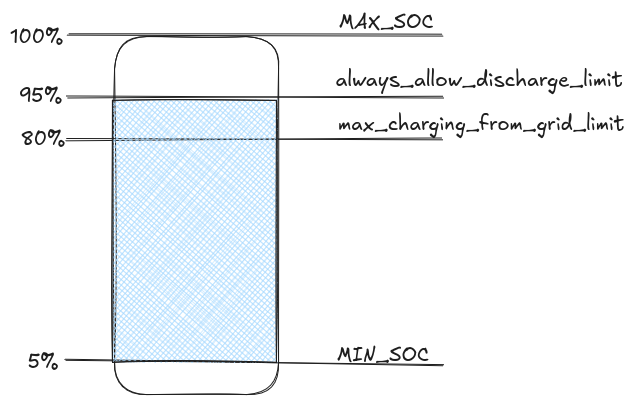
This diagram illustrates the relationship between the key battery SOC limits and how they control charging/discharging behavior.